Stacked Pumpkins: A Versatile Fall Design Asset for Creative Workflows
Stacked Pumpkins isn’t just another seasonal SVG—it’s a thoughtfully structured design asset built to integrate smoothly into real-world creative and production workflows. Whether you’re launching a limited-edition fall apparel line, prepping classroom decorations for October, or building cohesive social media assets for a small business campaign, Stacked Pumpkins serves as both a starting point and a flexible component in your broader planning and execution process.
What Stacked Pumpkins Is—and What It Enables
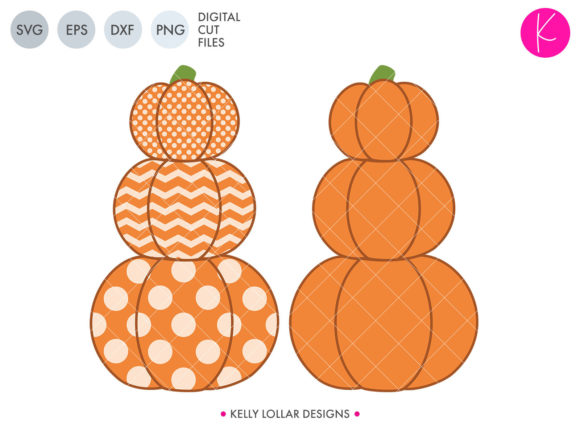
At its core, Stacked Pumpkins is a layered, multi-format SVG cut file featuring three vertically aligned pumpkins with a shared stem. But its utility goes beyond visual appeal: it ships with intentional variations—solid background shapes, fully welded outlines, a detachable stem, and three optional pattern layers (each welded separately). This structure reflects an understanding of how designers and makers actually work: not in isolation, but across platforms, materials, and deadlines.
The inclusion of DXF, EPS, PNG, and SVG formats means compatibility isn’t assumed—it’s engineered. Cricut Design Space users get clean vector paths. Silhouette Studio operators benefit from precise DXF alignment. Print-on-demand teams use the high-res PNG for mockup integration without transparency artifacts. And educators or bloggers who need quick social graphics can drop the SVG directly into Canva or Figma without conversion loss.
Fitting Into Your Pre-Project Workflow
Before cutting fabric or pressing a mug, preparation determines output quality. Stacked Pumpkins supports this phase by reducing format-related friction. If you’re sourcing designs for a holiday product launch, having all file types ready means less time troubleshooting imports and more time testing color palettes, sizing ratios, or material bleed margins. The separate pumpkin layers—especially the “all three pumpkins separate” version—let you preview scale adjustments on large-format vinyl or heat-transfer sheets before committing to full runs.
For educators planning a fall-themed unit, the optional patterns serve as built-in differentiation tools: students can choose between polka-dot, striped, or hatched versions based on skill level or project goals—no extra design time needed. For marketers, the plain stack version becomes a consistent brand anchor across email headers, Instagram carousels, and printable event signage—all while maintaining visual continuity.
Execution: How You Use It During Production
During active production, flexibility matters more than perfection. Stacked Pumpkins delivers that through modular layering. Need a minimalist look for linen napkins? Use the solid background shape. Creating layered iron-on transfers for hoodies? Weld the outline + stem, then apply patterns selectively per garment size. Running a batch of ceramic mugs? The PNG version embeds cleanly into sublimation software with no clipping path surprises.
The stem being separate isn’t just a technical detail—it’s a usability decision. When working with textured substrates like burlap or wood signs, you might want to adjust stem thickness or angle independently to maintain proportion. Or if you're laser-cutting thin plywood, detaching the stem lets you assign different power/speed settings to fine details versus broad pumpkin bodies.
Consistency across outputs also hinges on organization. Each file set is named clearly (e.g., stacked-pumpkins-pattern-hatch.svg), avoiding ambiguous labels like “final_v3_optimized.” That small naming discipline saves minutes per project—and hours over a season’s worth of files.
Post-Production Integration and Long-Term Use
After the first batch ships or the classroom display goes up, Stacked Pumpkins continues to earn its place—not as a one-off download, but as a reusable component in your growing asset library. Because the patterns are welded as individual pieces, you can swap colors without redrawing or repositioning. That makes seasonal refreshes efficient: change the orange to terracotta and the green stem to sage, and you’ve adapted the design for Thanksgiving without altering layout logic.
Small business owners often underestimate how much time they lose recreating similar assets year after year. With Stacked Pumpkins, the base structure stays constant. What changes is context: pairing it with a serif font for rustic signage, using negative space in the outline version for embroidery digitizing, or scaling the plain stack down for enamel pin templates. That repeatability compounds value—not just in time saved, but in brand recognition built over multiple seasons.
Compatibility and Platform-Specific Tips
Not all design environments treat SVGs the same way. Here’s what works reliably:
- Cricut Design Space: Upload the SVG with welded layers intact. Use the “Contour” tool only on the pattern layers if you want partial fills—never on the main stack, since welding preserves proportions.
- Silhouette Studio: Import the DXF for best precision on intricate cuts. The EPS version handles gradients well if you’re printing directly from Illustrator via Studio’s print-and-cut workflow.
- Canva & Figma: Drop the SVG in as a vector element. Resize freely—no pixelation. Use the PNG only when you need a fixed-resolution background (e.g., presentation slides).
- Sublimation & DTG Printing: Stick with the PNG at 300 DPI for best results. Avoid scaling beyond 200% to preserve edge clarity on curved surfaces like mugs.
Workflow Examples Across Roles
Hobbyists planning a fall craft fair booth use the separate-pumpkin version to test spacing on burlap banners, then switch to the solid background for iron-on tote bags. They save two versions per item—one with patterns for kids’ items, one plain for adult merchandise—keeping inventory labeling simple.
Freelance designers building client packages include Stacked Pumpkins as part of a “Fall Brand Kit” add-on: one SVG file becomes five deliverables (shirt graphic, social post template, email header, printable tag, and sticker sheet)—all derived from the same source without redesign.
Classroom teachers
Quality Control and Practical Checks
Before finalizing any output, run three quick checks:
- Layer alignment: Open the SVG in a vector editor and zoom to 400%. Confirm no stray anchor points or misaligned stems—especially where pumpkins meet.
- Export fidelity: Re-export your edited version as SVG and open it in a browser. If edges appear jagged or text shifts, go back and simplify paths instead of adding effects.
- Material test: Cut one pumpkin on scrap material first—even with optimized files, substrate texture and machine calibration affect outcome.
Stacked Pumpkins doesn’t eliminate those checks—but its clean construction reduces how often they’re needed.
Why This Fits Beyond Seasonal Decoration
Seasonal assets often get archived after November. Stacked Pumpkins resists that fate because its modularity supports repurposing. Remove the stem, flip one pumpkin horizontally, adjust spacing—and you’ve got a base for winter squash themes. Change the orange to deep plum and pair with gold foil textures, and it reads as elegant rather than playful. That adaptability makes it useful not just for Halloween and Thanksgiving, but for teaching design principles like hierarchy, rhythm, and variation.
Ultimately, Stacked Pumpkins works because it respects how people actually create: iteratively, across tools, under deadline pressure, and with intention—not just decoration in mind, but function, scalability, and reuse.