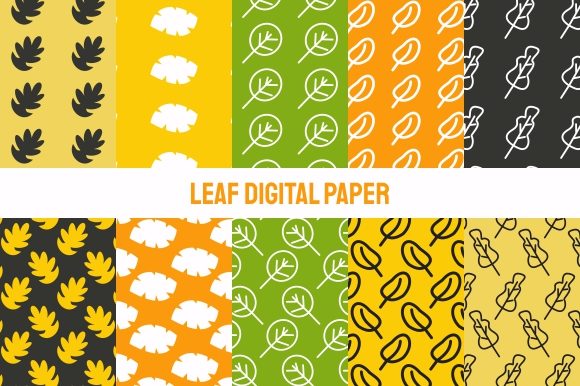
Leaf Digital Paper Art Bundle
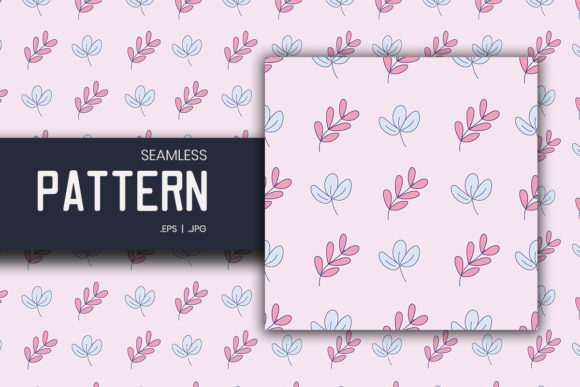
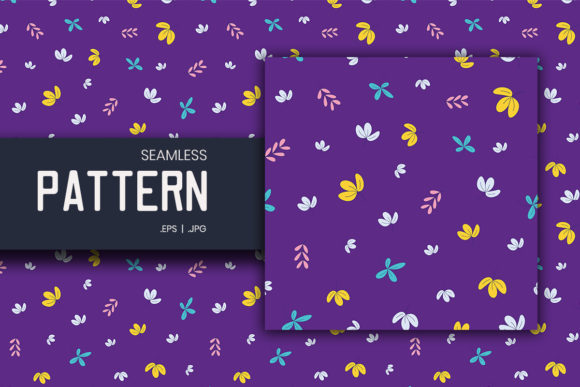
The Leaf Digital Paper Art Bundle is a curated set of ten high-resolution, seamless pattern files designed for real-world creative and commercial use. Each file is delivered as a JPG at 3600×3600 px — large enough for print at scale, crisp enough for digital backgrounds, and flexible enough to adapt across platforms and mediums. Unlike generic clipart or low-res downloads, this bundle prioritizes usability: no watermarks, no layers to unpack, no software dependency beyond standard image viewers or design tools.
Where It Fits in Your Creative or Business Workflow
This isn’t just another decorative download. The Leaf Digital Paper Art Bundle functions best when treated as an asset — not an end product, but a reliable component in a larger process. Think of it like quality typography or well-organized stock photography: something you reach for repeatedly because it saves time, maintains visual consistency, and supports execution without slowing you down.
For designers building brand collateral, the patterns serve as subtle yet distinctive background elements for presentations, social media banners, or email headers. For small business owners preparing product packaging or gift wrap, the seamless nature means scaling across custom boxes, tissue paper, or stickers without visible repeats or awkward cropping. Educators creating printable worksheets or classroom decor find the organic leaf motif both calming and professional — especially when printed on matte cardstock or applied to vinyl-cut wall decals.
Practical Integration Across Stages
You don’t need to wait until the final stage of a project to use the Leaf Digital Paper Art Bundle. Its value unfolds across phases:
- Before a project: Use one pattern as a mood board background while planning color palettes or layout structure. Its natural texture helps ground abstract ideas in tangible visual language.
- During production: Drop a file directly into Canva, Adobe Illustrator, or Affinity Designer as a swatch or fill layer. Because resolution is consistent and files are JPG-only, there’s no lag from embedded PSD layers or incompatible vector formats.
- After delivery: Repurpose a single pattern across multiple touchpoints — e.g., use the same leaf motif on a client’s invoice background, their event backdrop, and their thank-you card — reinforcing cohesion without redesigning from scratch.
Compatibility and Real-World Usability
Each file is optimized for broad compatibility. You’ll open them in Preview (macOS), Photos (Windows), GIMP, Photoshop, Figma, or even PowerPoint — no conversion needed. That simplicity matters when you’re juggling deadlines across clients or teaching a workshop where participants use mixed software setups.
The 3600×3600 px resolution strikes a practical balance: large enough to print at 12×12 inches at 300 DPI (ideal for fabric printing or wallpaper samples), yet small enough to load quickly in cloud-based editors. If you’re working with textile manufacturers, many accept JPGs at this size for digital printing runs — just confirm bleed and color profile requirements with your vendor beforehand.
Because these are flat JPGs, they integrate cleanly into CMS platforms like WordPress or Shopify. Upload one as a site background image, assign it to a section via CSS background-repeat, and let the seamless tiling do the rest — no extra plugins or code tweaks required.
Workflow Examples You Can Adapt Today
Example 1: Launching a Wellness Brand
A yoga instructor launching an online course uses three patterns from the bundle: one as the header background for her sales page, one tiled subtly behind her email newsletter, and one scaled down as a watermark on downloadable PDF guides. All share the same organic rhythm — reinforcing calm, growth, and continuity without needing custom illustration.
Example 2: Small Batch Product Packaging
A ceramicist producing limited-edition mugs prints one pattern onto kraft gift boxes and matching tissue paper. She uses the same file in her Etsy listing banner and Instagram story highlights. Consistency builds recognition; seamlessness ensures no misalignment during print setup.
Example 3: Classroom Resource Creation
A middle school science teacher creates editable Google Slides templates for student projects. She sets one leaf pattern as the master slide background — then shares the template with colleagues. Because it’s a JPG, it stays intact whether opened on Chromebook, iPad, or desktop — no missing fonts or broken vectors.
Preparation and Organization Tips
Start by renaming each file meaningfully — e.g., “leaf-bundle-mint-soft.jpg” instead of “IMG_004.jpg”. This pays off when scanning folders mid-project or sharing assets with collaborators.
Create a dedicated subfolder inside your main design assets library: /Patterns/Leaf-Digital-Paper-Art/. Add a simple text file listing dimensions, color notes (“cool-toned greens, neutral base”), and confirmed use cases (“used for fabric sample book, March 2024”). This turns passive storage into active knowledge management.
If you work across devices, sync this folder via Dropbox or iCloud. Since JPGs compress efficiently, syncing remains fast — unlike layered PSDs or raw camera files that clog bandwidth.
Quality Control and Long-Term Use
Check output before mass use. Print a 4×4 inch test swatch on your target paper stock — especially if using matte or textured finishes. Some leaf motifs render differently depending on ink absorption. Likewise, preview how the pattern behaves at smaller scales (e.g., 200×200 px) if repurposing for favicons or app icons — though this bundle is primarily intended for larger applications.
For long-term viability, avoid over-editing the original files. Keep them untouched in your master folder. Make copies for adjustments — brightness tweaks, color overlays, or cropping — so you always have clean source material for future needs.
How It Interacts With Other Tools and Decisions
The Leaf Digital Paper Art Bundle doesn’t replace tools — it complements them. Pair it with:
- Color pickers (like Coolors or Adobe Color) to extract harmonizing accent tones from the patterns for typography or UI elements.
- Print-on-demand services (Printful, Gelato) — upload any file directly to generate mockups for apparel, notebooks, or wall art.
- Brand guidelines — include a note about approved pattern usage (e.g., “Use only full-bleed or centered placement; avoid stretching or skewing”) to maintain integrity across team members.
- Client contracts — clarify licensing scope early. This bundle permits commercial use, but reselling the files themselves or claiming authorship isn’t permitted.
Final Observation: Simplicity Scales
What makes the Leaf Digital Paper Art Bundle effective isn’t complexity — it’s reliability. Ten files. One resolution. No friction. In workflows where speed, consistency, and clarity matter most, that kind of predictability becomes infrastructure. It’s the difference between hunting for assets mid-deadline and knowing exactly where to go — and what you’ll get when you open the folder.
Use it where repetition adds value, not distraction. Apply it where nature-inspired texture supports your message — not competes with it. And treat it like the tool it is: quiet, ready, and built to stay useful across projects, platforms, and years.